Using Xreveal
Installation
The installation wizard will guide you through the setup, and it only takes a few clicks. In most cases, you don't need to restart your computer after installing Xreveal, Xreveal will try to load the kernel driver automatically. If Xreveal doesn't work after installation, please try restarting computer.
If you want to remove BD+ protection offline, please download and install Xreveal Plugins 1.0.
Run
Double-click the Xreveal icon on the desktop to launch Xreveal.
When Xreveal runs you can see the Xreveal icon in the system tray at the bottom right corner of Windows.
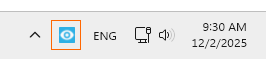
If the Xreveal icon is not there, please click the upward arrow  to show it: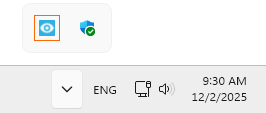
Xreveal tray menu
Right-click the Xreveal icon in the system tray to display the Xreveal tray menu:
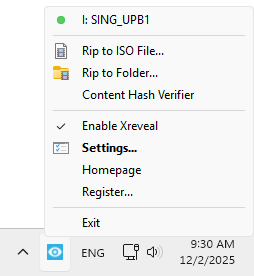
- Rip to ISO file
Rip a disc to an ISO file. - Rip to Folder
Rip a disc to(as) a folder. - Content Hash Verifier
Verify the integrity of Blu-ray M2TS files, ecrypted M2TS files can also be verified. - Enable Xreveal
This turns Xreveal on and off and is set "on" by default. Normally you do not need to change this unless you are using other software that may conflict with Xreveal. When Xreveal is "disabled" the Xreveal icon in the system tray will turn gray. - Settings...
This will open the Xreveal Settings window. The "Settings" are also available with a single mouse click on the system tray Xreveal icon. - Homepage
Jump to Xreveal Homepage. - Register...
Here you can paste the license key to upgrade to Xreveal Pro. - Exit
Exit Xreveal.