Rip to Folder
Rip a disc to(as) a folder.
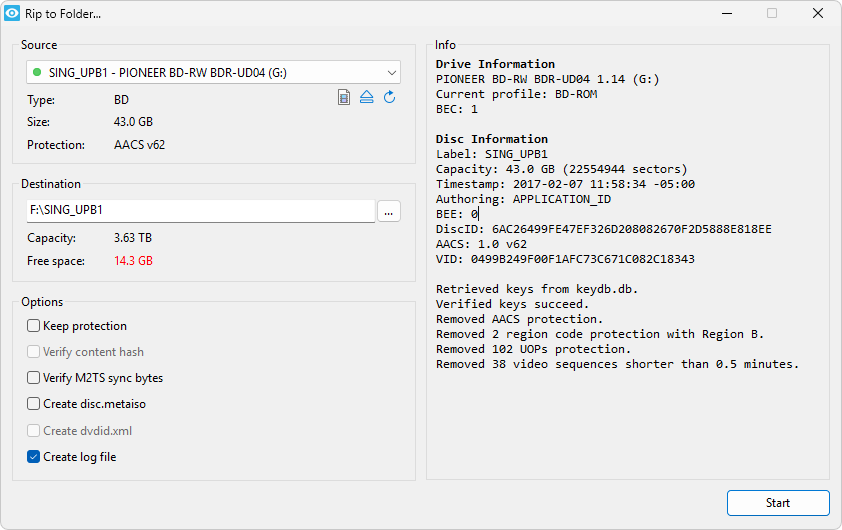
Source
Here you can select the source drive, list the type of disc in the drive, the disc capacity, and the protections contained on the disc.
Clicking  will switch to Rip to ISO File.
Clicking  will eject the disc.
Clicking  will load the disc.
Clicking  will will refresh the information in the current window.
Right-click these buttons to customize which buttons are displayed.
Destination
Here you can set the target path, list the target drive capacity and free space.
If there is no enough space in the target drive, the Free Space will be show in red color.
Info
Here lists the drive info log information.
Options
- Keep protection BD UHD HD-DVD
- If this option is checked, Xreveal will only remove bus encryption. Equivalent to a 1:1 original copy of disc data.
- If you encounter a disc that Xreveal cannot open, you can select this option. Once Xreveal supports this disc, mount disc.metaiso as a virtual drive then open it with Xreveal.
- Verify content hash BD UHD
- This will load content hash in /AACS/ContentHash000.tbl ..., and verify content hash with each 192 KB (one hash unit, 96 sectors) in M2TS stream.
- Verify M2TS sync bytes BD UHD
- This will verify the 0x47 sync byte in each 192-byte M2TS packet.
- Create disc.metaiso
- This will create a disc.metaiso in the destination directory.
- Create dvdid.xml DVD
- This will create dvdid.xml for DVD disc.
- Create log file
- This will create log file in the destination directory.
- Copy only VIDEO_TS folder DVD
- This will copy only the VIDEO_TS folder.